Mentions work much in the same way as used in twitter. If you wish to draw a members attention to a post or a point in a post you type @ before the Members name e.g. @Jennyleez
It is case sensitive but pretty clever. As in the above example as you type @jen my name and avatar will appear and you can click on it.
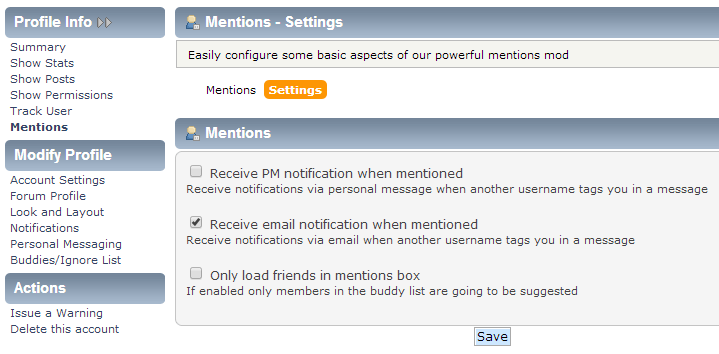
Depending on my configuration I will either receive an email with a link to the Post or a PM notification.
To configure your
Mentions run your mouse over Profile from the Top Menu.
Select Mentions. That will take you to any
Mentions you may have.
Click on Settings and select how you would like to be notified of any
Mentions made to you by members. This will activate
Mentions for you.
If you do not wish to receive notification of any Mention directed at you. In settings leave all 3 options unchecked.
Click Save when finished.
If you wish to test this once you have completed Settings, post underneath and I will post back using your @Username.


 Share Topic
